Audience Hub

Project Overview

Loblaw’s Audience Hub let users build audiences for programmatic advertising campaigns, but the legacy interface was slow, confusing, and prone to errors, and it didn’t support expanding business goals. As Lead Product Designer, I partnered with Product and Engineering to redesign the platform end-to-end, simplifying query rules, improving hierarchy, and creating an intuitive, reliable experience.

Role → Lead Product Designer

Industry → Programmatic Advertising

Duration → 12 months

Skills → Product Design, Design Systems, Competitive Analysis, User Interviews, Usability Testing, Design QA

Tools → Figma, Miro, Jira

AI Tools → Garfielld (Internal Generative AI Platform), Claude

Key Outcomes & Results

140% Increase in Active Users

After the initial launch, active users grew from 51 to 120, demonstrating stronger adoption and sustained engagement as usability improvements reduced friction and made the product more intuitive for core users.

70% Faster Task Completion

By restructuring the workflow and simplifying key interactions, we reduced task completion time from 10 minutes to under 3 minutes. This redesign removed unnecessary steps, clarified the interface, and allowed users to accomplish their goals more efficiently, improving both usability and overall satisfaction.

Enabled Data-Driven Decisions

Introduced a new performance reporting system that gave teams clear, actionable insights, including real-time audience demographics and campaign performance metrics. By making key data accessible and understandable, users were able to make informed, data-driven decisions that improved overall product strategy and outcomes.

Understanding the Problem

Users struggled with the legacy Audience Hub: the query builder was cluttered, confusing, and slow, and teams couldn’t track audience performance. Although users could complete tasks, the platform wasn’t flexible enough to support evolving business goals, limiting adaptability and growth.

Research Insights

Turning Research into Product Direction

I partnered with the UX Research Team to understand our core users — media buyers at large brands like Coca-Cola and P&G. The goal was to uncover how they build and manage audiences, what metrics matter most to them, and where the existing Audience Hub fell short. This research helped identify key opportunities to improve workflows, simplify complex tasks, and provide actionable performance insights.
Aligning Product Decisions with User Motivations

The primary users of Audience Hub are media buyers at major brands like Coca-Cola and P&G. They need tools that make audience building fast and intuitive, with real-time insights into demographics and campaign performance to support data-driven decisions. On the legacy platform, they struggled with unintuitive workflows, a cluttered interface, and confusing tools like the Query Builder, which made audience creation slow and error-prone. These users often work under tight deadlines, juggle multiple advertising tools, and prefer streamlined, efficient workflows that minimize manual effort. Understanding their goals, pain points, and behaviors guided design decisions to create a more efficient, user-friendly, and insight-driven experience.

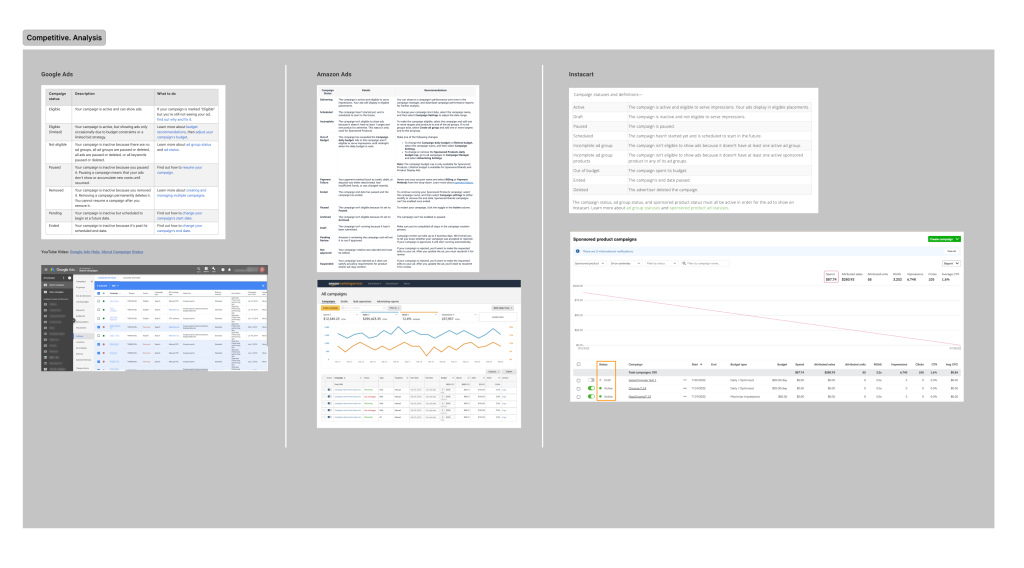
Competitive Analysis to Identify UX Gaps and Opportunities

Conducted a competitive analysis of leading audience-building tools to identify gaps and opportunities in UX, functionality, and positioning, using AI to structure notes and insights efficiently.

Mapping the User Journey to Inform Design Decisions

I mapped the user flow to understand how media buyers navigated Audience Hub, uncovering pain points and opportunities that informed key design decisions.

My Design Contributions

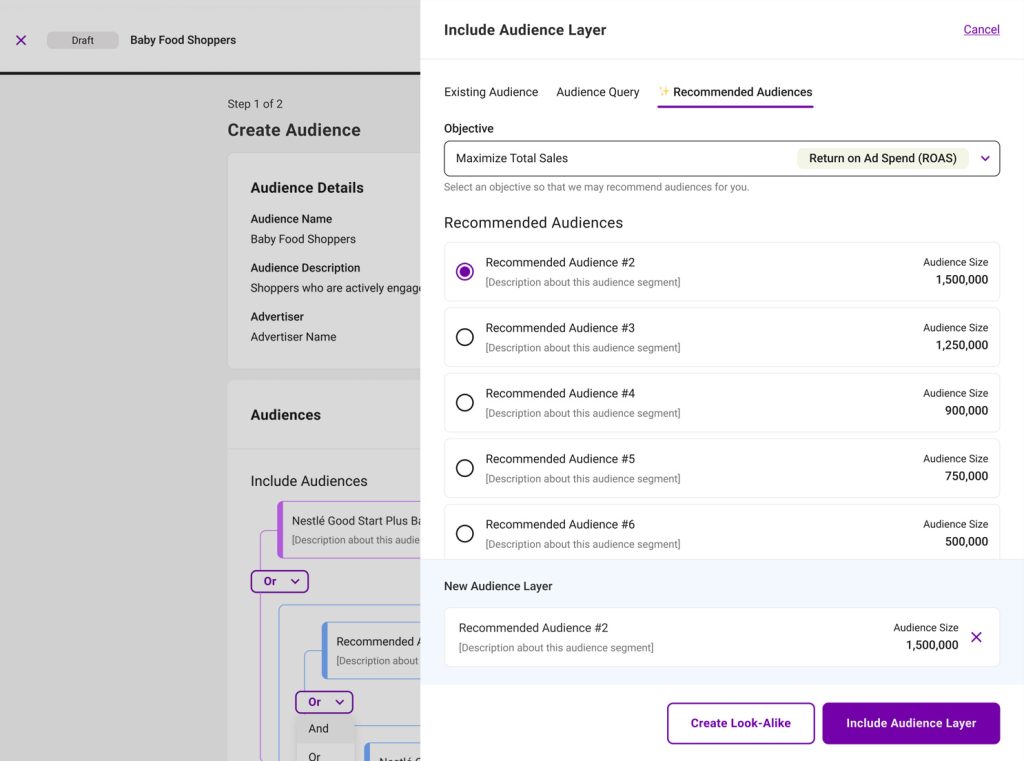
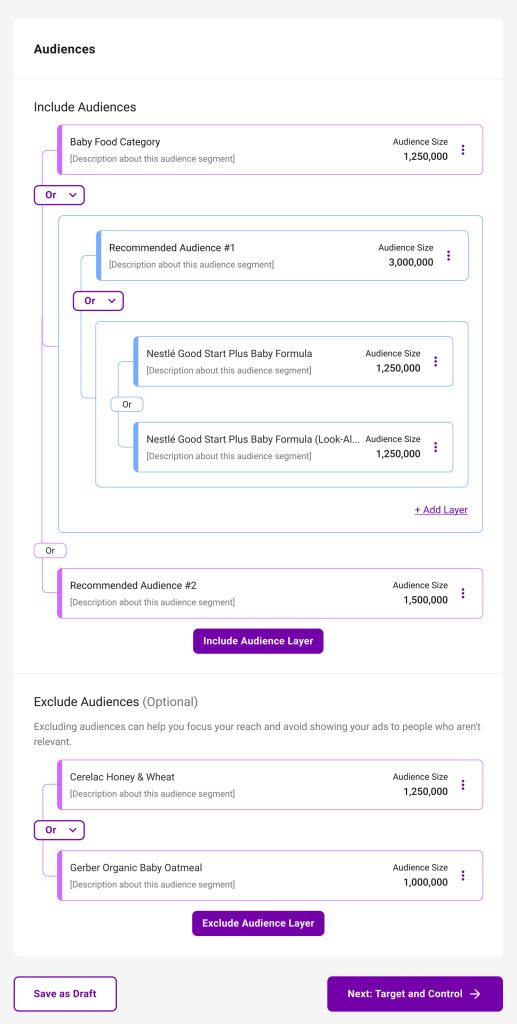
Optimizing the Query Builder to Reduce User Effort

I redesigned the Audience Builder to address a key problem: the original tool was slow, required too many clicks, and offered minimal visual feedback, making it frustrating for users to build audiences accurately. My solution focused on usability, clarity, and visual hierarchy, simplifying workflows, providing clearer feedback, and streamlining interactions so the experience felt faster and easier to use. The impact was clear: users could build audiences with less effort and fewer errors, and active users grew by 140%, increasing from 51 to 120.

Streamlining How Users Build Audiences

The original workflow for segmenting target audiences was slow and complex, taking users up to 10 minutes to complete a task. Using AI to explore different design solutions, I redesigned the experience to be more intuitive, introducing real-time filters and clear visual feedback. The result was a dramatic improvement: task time was reduced by over 70%, bringing completion down to just 1–3 minutes.

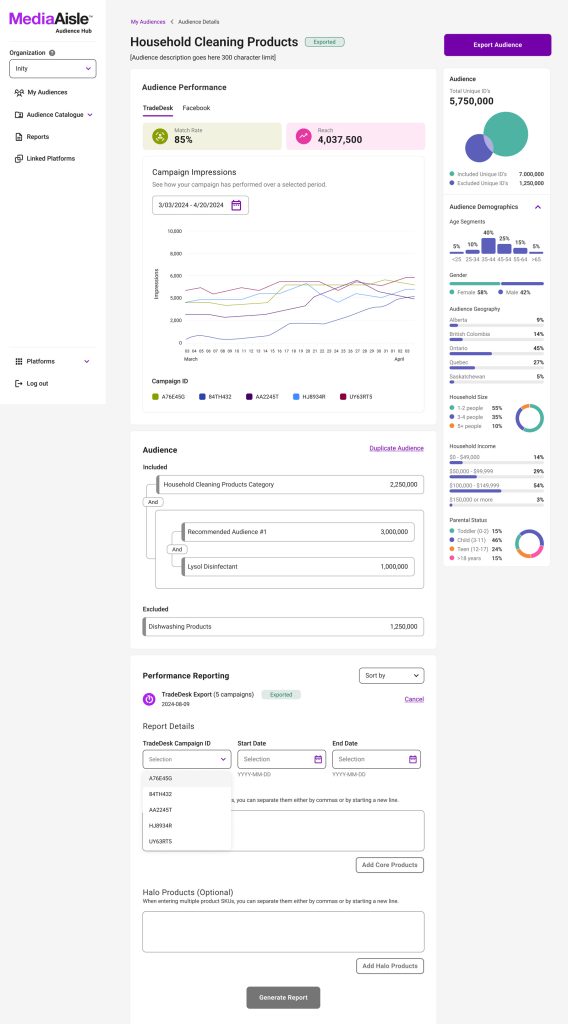
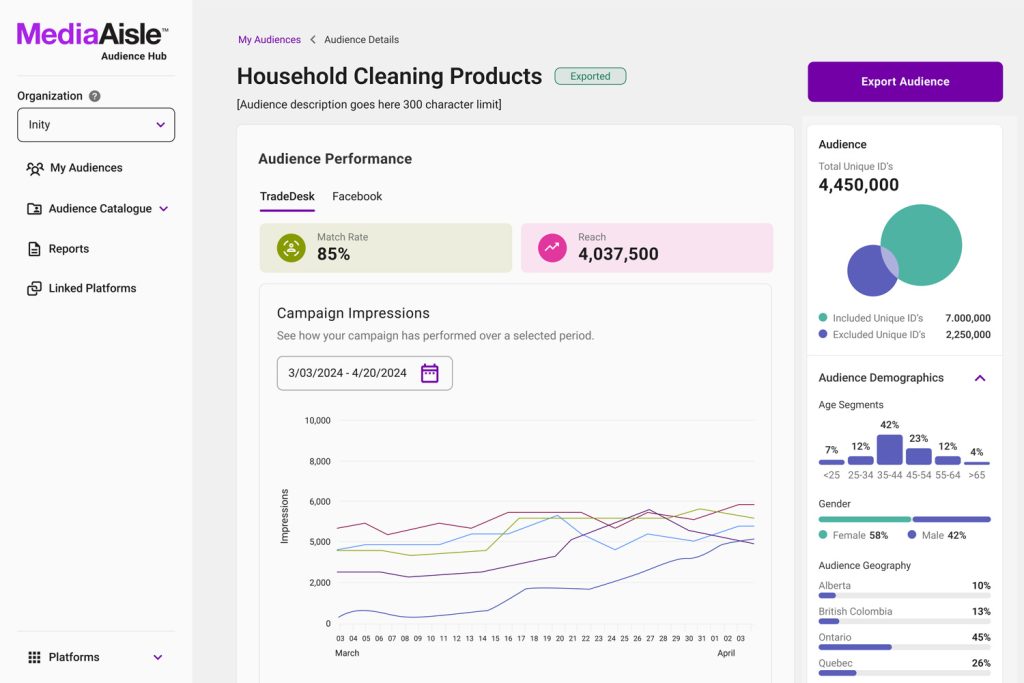
Making Performance Data Visible and Actionable

Users previously had no access to performance data, leaving them without insight into how their audiences were performing. I designed a Performance Reporting tool that provided clear metrics, at-a-glance visuals, and one-click attribution reporting, giving users meaningful visibility for the first time. The result was an experience that empowered teams to track performance, make informed decisions, and take action with confidence.

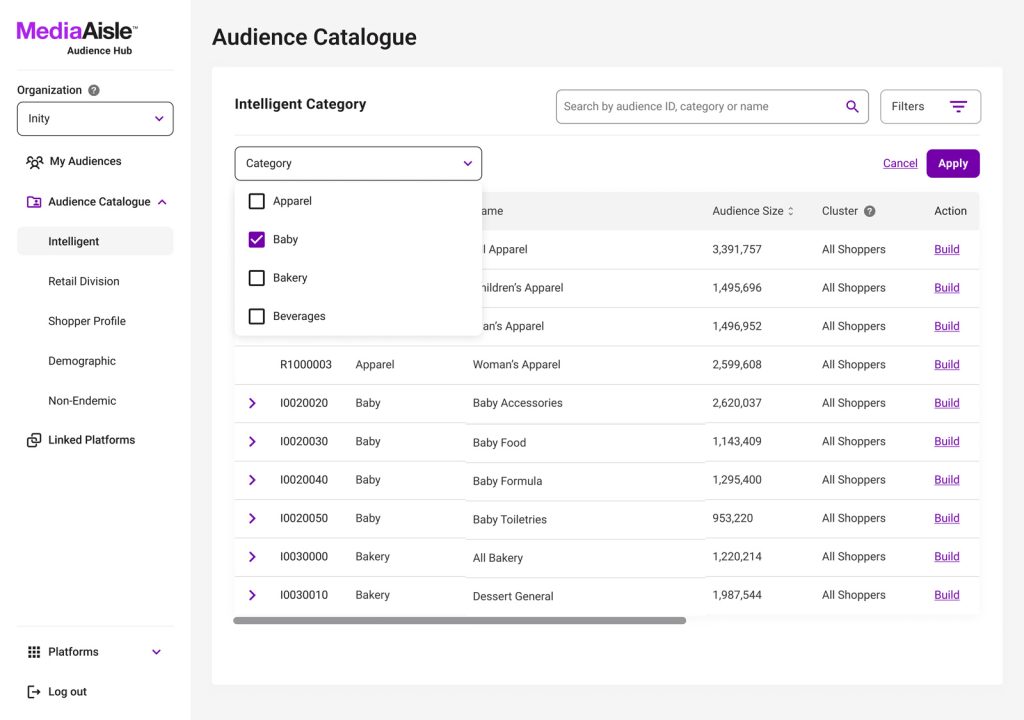
Redesigning Complex Data Tables for Clarity and Speed

Users struggled to navigate large data tables, making it difficult and frustrating to find the information they needed. I redesigned the tables with improved layout, spacing, and sorting and filtering features, making large datasets easy to scan and interact with. As a result, users could access and act on information more efficiently, reducing frustration and improving workflow speed.
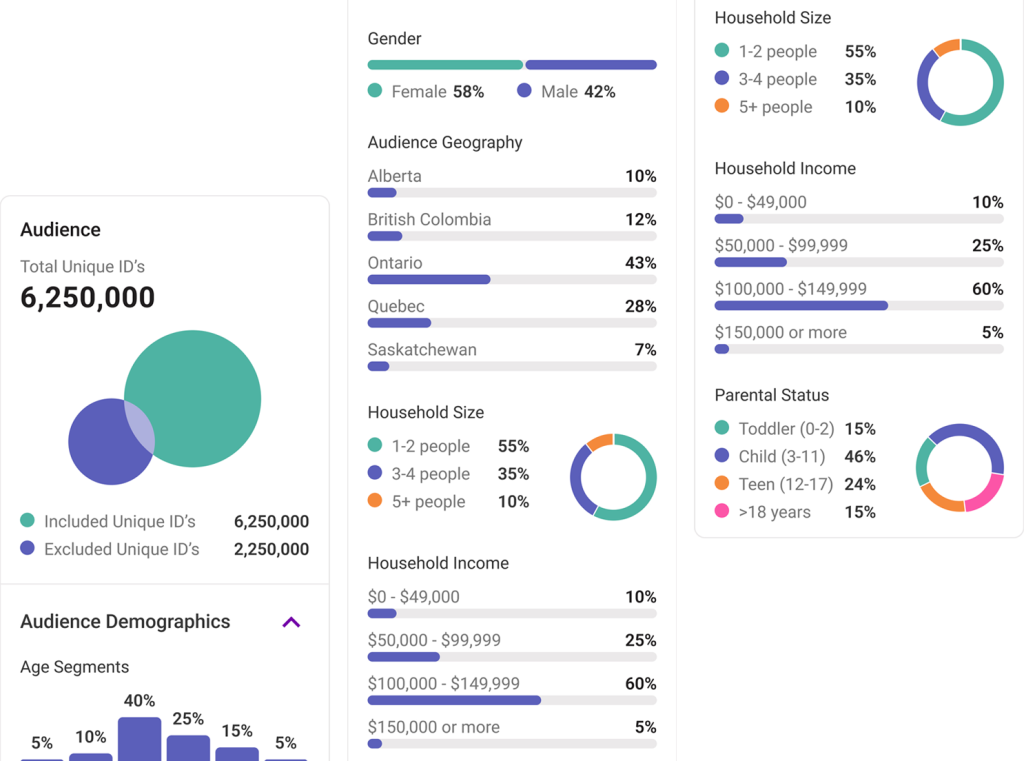
Making Audience Insights Instantly Accessible

Users couldn’t view audience demographics in real-time, which made it difficult to gain insights and make informed decisions. I designed a sidebar that displayed live data, allowing users to explore and act on information quickly. The result was a more transparent, actionable experience that helped teams understand their audiences and optimize campaigns in real-time.

Validating Through Prototyping and Usability Testing

Stakeholders needed a way to preview the product and validate key user flows before development. I created a high-fidelity prototype that allowed for early feedback and usability testing, uncovering pain points and refining interactions. The result was a streamlined, user-friendly flow that aligned with the overall vision and reduced development risk.

Insights

This project taught me a lot about working with tight deadlines and complex workflows. One of the biggest challenges was making the platform feel clear and intuitive while keeping it accurate and scalable. I leaned on rapid prototyping to test ideas quickly with users and iterated based on feedback, and I made sure to document workflows and design decisions for developers so handoffs were smooth and everyone was on the same page.

If I were to do it again, I’d bring users into the process even earlier to better understand how they think and reduce some of the trial-and-error. Overall, the project helped me grow in systems thinking, prototyping, and designing for complex workflows, and reinforced just how valuable clear documentation and close collaboration with engineering really are.

Angelo joined us during the launch of a new platform – an exciting yet challenging period that required adaptation to uncertainty and ambiguity. He demonstrated exceptional ability in managing these complex situations while maintaining a consistent level of creativity. This intrinsic capacity to navigate through unchartered territories speaks volumes about his ability as a designer.

Daria Yurchenko - Product Design Lead at Loblaw Digital